
AN OPERATING SYSTEM FOR THE BUILT WORLD

The built world,
connected.

Property. Projects. People.
Real estate workflows, connected.

A Fuller picture
01 / ECOSYSTEM

Different perspectives.
One Fuller picture.

For the people who own, build and use the places around us.

Find your world
START WITH YOUR WORLD

A lot to explore. Find your way in.

/
Why Fuller?

What is Fuller?

Fuller is the digital backbone for the built world. It connects property operations, development workflows, and end-user experience into one unified platform.

Whats the problem?

The built world, society’s largest asset class, runs on broken systems—spreadsheet chaos, outdated tools, siloed teams. It’s slow, wasteful, and expensive.

How are we different?

We are digitizing (and connecting) every part of the real estate lifecycle, while giving you real-time visibility into assets, projects, and people while simultaneously integrating with tools you already use.

For whom?

CREET: For investors, owners & operators to run leaner, smarter portfolios

Framework: For developers to move faster from feasibility to optimization

Hover: For end-users to interact with space, services, and community

Fuller is an operating system for the built world.

American cities & suburbs are living, breathing organisms, but they run on static, antiquated software. Thats why we’re building Fuller.

If you’re interested in a full tech stack for your property or investments, click here.

If you’re involved in a development project we have tech for you too… click here.

Lastly, if you’re an occupant (home or work) in a space or are looking for space, click here.

02 / PROPERTY · CREET

A clearer picture.
A stronger portfolio.

Keep operations, capital, assets and market intelligence in view.

Explore the interfaces

For investors, owners & operators

Explore 7 interfaces

Choose your workspace ↓
UME

Portfolio Management

Asset & portfolio managers
UME — Portfolio Management interface
THE INTERFACE

Maximize asset value with real-time portfolio insights and strategic oversight.

How UME works

Ume gives you full control over your real estate portfolio, integrating asset management, financial tracking, development oversight, and capital planning in one platform. Make data-driven decisions, optimize performance, and ensure long-term growth with seamless visibility across all your holdings.

05

tools, one
connected workspace

See what’s inside
Explore UME’s 5 toolsA closer look

INSIDE UME

1 / 5
TOOL 01 / UME

Tool #1: Portfolio Management Hub

Oversee your entire holdings with real-time insights into asset performance, financial health, and operational efficiency. Track key metrics, compare assets across your portfolio, and identify opportunities for optimization. Centralize reporting and decision-making to maximize returns and streamline management.

UME — Portfolio Management Hub
TOOL 02 / UME

Tool #2: Pipeline Management Hub

Track and manage potential acquisitions, developments, and dispositions with real-time visibility into every stage of the deal pipeline. Monitor progress, assess risks, and forecast outcomes to prioritize high-value opportunities. Streamline workflows and decision-making to keep your pipeline moving.

UME — Pipeline Management Hub
TOOL 03 / UME

Tool #3: Asset & Property Mgmt. Hub

Optimize asset performance and streamline property operations with integrated tools for monitoring financial health, maintenance, and tenant relations. Track KPIs, manage leases, and oversee day-to-day operations. Centralize reporting and automate workflows for seamless management across your portfolio.

UME — Asset & Property Mgmt. Hub
TOOL 04 / UME

Tool #4: Development Mgmt. Hub

Manage projects from concept to completion with tools for budgeting, scheduling, and risk assessment. Track progress in real time, oversee contractors and stakeholders, and ensure alignment with project goals. Optimize timelines and resources to deliver developments on budget and on schedule.

UME — Development Mgmt. Hub
TOOL 05 / UME

Tool #5: Capital Mgmt. Hub

Oversee funding strategies with tools to track capital sources, allocations, and returns across your portfolio. Monitor equity and debt positions, manage capital calls, and optimize financial structures for maximum efficiency. Gain real-time insights to support strategic investment decisions and ensure financial health.

UME — Capital Mgmt. Hub
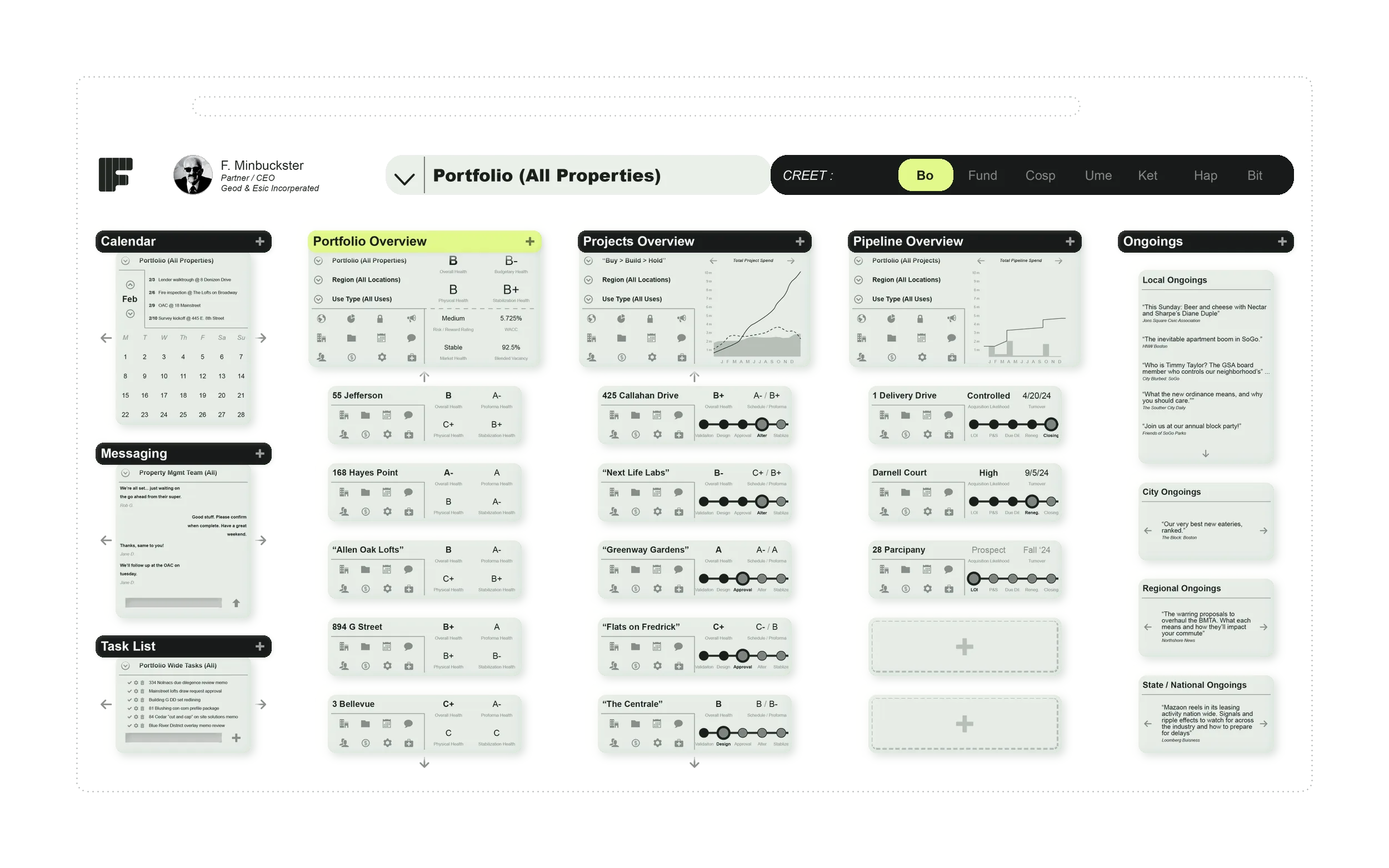
BO

Business Operations

Operators & leadership
BO — Business Operations interface
THE INTERFACE

Seamlessly manage real estate operations, tasks, assets, and financials in one place.

How BO works

Bo simplifies complex property operations by centralizing scheduling, task management, asset tracking, and financial oversight. Eliminate inefficiencies, automate workflows, and gain real-time insights—keeping your portfolio running smoothly and profitably without the operational headaches.

05

tools, one
connected workspace

See what’s inside
Explore BO’s 5 toolsA closer look

INSIDE BO

1 / 5
TOOL 01 / BO

Tool #1: Property Activity Hub

Stay on top of property operations with a unified calendar for scheduling events, project milestones, and deadlines. Prioritize, assign, and track tasks with real-time updates and automated creation for urgent issues. Streamline communication with in-app messaging, automated notifications, and group broadcasts.

BO — Property Activity Hub
TOOL 02 / BO

Tool #2: Portfolio Overview

Get a complete view of your portfolio with real-time insights into asset health, performance, and stability. Track key metrics, access historical records, and benchmark performance to drive continuous improvement. Early warning alerts and scenario analysis tools help you stay ahead of challenges and optimize outcomes.

BO — Portfolio Overview
TOOL 03 / BO

Tool #3: Projects Overview

Monitor the health and progress of your projects with real-time dashboards tracking budgets, timelines, and risks. Access tools for scope management, milestone tracking, and performance reports to stay on target. Proactively address challenges with risk alerts and trend analysis for smarter project outcomes.

BO — Projects Overview
TOOL 04 / BO

Tool #4: Pipeline Overview

Evaluate opportunities with tools to monitor progress, assess risks, and analyze market conditions. Track capital stack health, compare acquisition terms, and receive real-time insights into local and regional market trends. Streamline decision-making with scoring and forecasting tools for informed investments.

BO — Pipeline Overview
TOOL 05 / BO

Tool #5: Ongoings Overview

Stay informed with real-time updates on local, citywide, regional, and national developments impacting your portfolio. Track market trends, infrastructure projects, and policy changes that affect property values and operations. Analyze community sentiment and economic indicators to make data-driven decisions.

BO — Ongoings Overview
FUND

Capital Management

Finance & investment teams
FUND — Capital Management interface
THE INTERFACE

Optimize capital structure, track investments, and streamline financial decision-making. 

How FUND works

Fund gives you full visibility into your capital stack, from GP and LP equity to debt financing. Manage funding sources, monitor financial health, and forecast returns with real-time insights— ensuring smarter, more strategic investment decisions and maximizing profitability.

04

tools, one
connected workspace

See what’s inside
Explore FUND’s 4 toolsA closer look

INSIDE FUND

1 / 4
TOOL 01 / FUND

Tool #1: Capital Stack Management

Streamline your financing strategy with a comprehensive capital stack management hub that tracks budgets, sources, and uses of funds. Monitor debt-to-equity ratios, analyze funding gaps, and simulate the impact of market fluctuations on your financial structure. Stay agile with tools for real-time updates and detailed reporting to ensure balanced and optimized capital stacks.

FUND — Capital Stack Management
TOOL 02 / FUND

Tool #2: Debt Lending Hub

Centralize your debt management with a lending hub that tracks financing offers, term sheets, and lender performance. Compare loan structures, monitor interest rate trends, and assess debt capacity to secure optimal terms. Real-time updates and automated tools ensure efficient management of all debt-related activities from negotiations to closing.

FUND — Debt Lending Hub
TOOL 03 / FUND

Tool #3: LP Equity Hub

Optimize limited partner investments with tools to structure equity, track commitments, and calculate preferred returns. Generate detailed prospectuses, simulate risk-return scenarios, and manage capital calls with ease. Provide LPs with personalized dashboards, real-time updates, and seamless onboarding for a transparent and efficient equity process.

FUND — LP Equity Hub
TOOL 04 / FUND

Tool #4: GP Equity Hub

Streamline general partner equity management with tools to structure contributions, model risk-return scenarios, and track equity commitments in real time. Create professional term sheets, investor presentations, and allocation models to attract and retain GP investors. Enhance transparency with dashboards, onboarding guides, and automated reporting for seamless equity management.

FUND — GP Equity Hub
COSP

Acquisitions & Dispositions

Acquisitions & dispositions
COSP — Acquisitions & Dispositions interface
THE INTERFACE

Identify, evaluate, and execute real estate deals with confidence and speed.

How COSP works

Cosp streamlines the entire acquisition and disposition process, from prospecting and feasibility analysis to negotiations and closing. Gain real-time market insights, manage due diligence, and execute deals efficiently—ensuring you never miss an opportunity or overpay for an asset.

05

tools, one
connected workspace

See what’s inside
Explore COSP’s 5 toolsA closer look

INSIDE COSP

1 / 5
TOOL 01 / COSP

Tool #1: Prospects Hub

Identify high-potential acquisitions with market analysis, competitive insights, and automated scoring. Customize criteria, generate property prospectuses, and streamline decision-making. Organize and prioritize leads with integrated CRM tools for efficient pipeline management.

COSP — Prospects Hub
TOOL 02 / COSP

Tool #2: Feasibility Hub

Evaluate potential acquisitions with tools for financial modeling, market demand analysis, and risk assessment. Analyze design constraints, construction viability, and regulatory compliance to ensure project feasibility. Make informed decisions with comprehensive insights into financial, legal, and political factors.

COSP — Feasibility Hub
TOOL 03 / COSP

Tool #3: LOI / PSA Hub

Streamline offer creation and negotiations with tools for generating, comparing, and managing Letters of Intent and Purchase & Sale Agreements. Track key terms, automate workflows, and monitor negotiation history. Ensure smooth transactions with integrated approvals and real-time updates.

COSP — LOI / PSA Hub
TOOL 04 / COSP

Tool #4: Due Diligence Hub

Manage the due diligence process with tools for tracking documentation, compliance checks, and risk assessments. Centralize property inspections, financial audits, and legal reviews to ensure thorough evaluations. Stay organized with automated workflows, progress tracking, and real-time reporting.

COSP — Due Diligence Hub
TOOL 05 / COSP

Tool #5: Closing Center

Facilitate transactions with tools for tracking payments, onboarding stakeholders, and property turnover. Automate closing checklists, track financial disbursements, and ensure all compliance requirements are met. Streamline post-closing with centralized docs and real-time status updates.

COSP — Closing Center
KET

Market Analysis

Market research teams
KET — Market Analysis interface
THE INTERFACE

Unlock deep market insights to drive smarter investment and development decisions.

How KET works

Ket consolidates critical market data—supply, demand, pricing, and trends—into a single, interactive platform. With real-time analytics, GIS mapping, and expert reports, you gain the intelligence needed to stay ahead of shifts, identify opportunities, and make data-driven decisions with confidence.

05

tools, one
connected workspace

See what’s inside
Explore KET’s 5 toolsA closer look

INSIDE KET

1 / 5
TOOL 01 / KET

Tool #1: Area Overview

Explore neighborhoods with an interactive GIS platform that layers custom data over existing mapping technology. Upload market data, analyze demographic trends, and visualize property insights in real time. Gain a comprehensive understanding of local dynamics to inform investment and development decisions.

KET — Area Overview
TOOL 02 / KET

Tool #2: Direct Help Line

Connect instantly with in-house experts or local professionals for real-time insights on specific markets. Access tailored advice from trusted sources to support investment, development, and operational decisions.

KET — Direct Help Line
TOOL 03 / KET

Tool #3: Data / Reports Center

Access a library of pre-made market reports from local professionals or order custom reports tailored to your needs. Stay informed with expert insights on market trends, property values, and regional dynamics. Streamline decision-making with reliable, data-driven analysis at your fingertips.

KET — Data / Reports Center
TOOL 04 / KET

Tool #4: Market Metrics Hub

Analyze supply, demand, pricing, and asset sizing across all property types in a given market. Organize and compare key metrics to identify trends, uncover opportunities, and inform strategic decisions. Gain a comprehensive view of market dynamics with centralized, data-driven insights.

KET — Market Metrics Hub
TOOL 05 / KET

Tool #5: Market Trends Center

Track the very same market metrics over time to identify emerging trends and shifts in the market. Visualize historical performance across asset classes to inform forecasting and strategic planning. Stay ahead of market changes with dynamic, time-based insights.

KET — Market Trends Center
HAP

Local News & Sentiment Analysis

Local intelligence teams
HAP — Local News & Sentiment Analysis interface
THE INTERFACE

Understand and engage with the community through real-time local insights.

How HAP works

Hap keeps you connected to the pulse of your market by tracking local sentiment, policy changes, infrastructure projects, and community discussions. Whether you’re an investor, developer, or operator, stay ahead of shifts, mitigate risks, and align your strategies with real-world dynamics.

05

tools, one
connected workspace

See what’s inside
Explore HAP’s 5 toolsA closer look

INSIDE HAP

1 / 5
TOOL 01 / HAP

Tool #1: Community Dialog Hub

Foster transparent communication between residents, the private sector, and public agencies with a centralized, Twitter-like feed. View and contribute to real-time updates, discussions, and announcements organized by geographic area.

HAP — Community Dialog Hub
TOOL 02 / HAP

Tool #2: Dialog Map

Visualize community conversations with an interactive map. Explore real-time discussions and updates across neighborhoods, with filters to focus on specific topics or areas. Gain spatial insights into community sentiment and activity at a glance.

HAP — Dialog Map
TOOL 03 / HAP

Tool #3: Alerts Center

Receive real-time notifications from authorities, healthcare professionals, and municipalities on critical updates and public safety information. Centralize emergency alerts, health advisories, and service disruptions to keep communities informed and prepared.

HAP — Alerts Center
TOOL 04 / HAP

Tool #4: Forums

Dedicated forums to discuss community issues, share ideas, and collaborate on solutions. Participate in topic-specific conversations, vote on petitions, and contribute to initiatives that shape your neighborhood. Foster civic engagement with a platform designed for inclusive dialogue and decision-making.

HAP — Forums
TOOL 05 / HAP

Tool #5: Contribution Center

Empower users to actively participate by sharing updates, ideas, and feedback within the community. Submit posts, respond to discussions, and contribute to ongoing conversations that influence local decisions. Foster a collaborative environment where every voice can be heard.

HAP — Contribution Center
BIT

Back of House Technology

Operations & technology
BIT — Back of House Technology interface
THE INTERFACE

Streamline operations, finance, legal, and compliance with an integrated ERP system.

How BIT works

Bit centralizes critical back-office functions, from accounting and vendor management to legal tracking and SOP enforcement. Reduce inefficiencies, automate workflows, and ensure seamless coordination across departments—giving your team the tools to operate smarter, faster, and with total control.

05

tools, one
connected workspace

See what’s inside
Explore BIT’s 5 toolsA closer look

INSIDE BIT

1 / 5
TOOL 01 / BIT

Tool #1: ERP Technology

Streamline operations by allocating tasks and setting goals across your organization with an intuitive, centralized platform. Track progress, assign responsibilities, and ensure alignment with company objectives in real time. Simplify workflow management for greater efficiency and accountability.

BIT — ERP Technology
TOOL 02 / BIT

Tool #2: Accounting Hub

Manage AP/AR, general ledger entries, and vendor relationships in one streamlined platform. Simplify financial tracking and maintain clear oversight of your organization’s financial health. Ensure accuracy and efficiency with integrated tools for comprehensive accounting management.

BIT — Accounting Hub
TOOL 03 / BIT

Tool #3: Legal Hub

Centralize legal operations with tools to track contracts, entitlements, approvals, and compliance across all business segments. Manage legal matters efficiently with organized workflows, document tracking, and real-time updates. Empower in-house legal teams to streamline processes and ensure regulatory alignment.

BIT — Legal Hub
TOOL 04 / BIT

Tool #4: Document Management

Organize and manage all property-related documents with a centralized, easy-to-use system. Store contracts, leases, approvals, and compliance files for quick access and seamless collaboration. Ensure document security and streamline workflows with standardized templates and version control.

BIT — Document Management
TOOL 05 / BIT

Tool #5: SOP Center

Track internal benchmarks, goals, and industry standards to ensure consistency and compliance across the organization. Centralize standard operating procedures and streamline performance monitoring with real-time updates and data insights.

BIT — SOP Center
The bigger picture: CREET

C.R.E.E.T.

Property Technology

1: Business operations

2: Capital management

3: Acquisitions & dispositions

4: Portfolio management

5: Market analysis

6: Local news

7: Back of house technology

C.R.E.E.T. is a comprehensive, integrated platform tailored to meet the critical needs of asset managers, property owners, and investors, providing 80% of their essential functions with just 20% of the tools. Designed to simplify and optimize operations, C.R.E.E.T. covers everything from portfolio and project management to acquisitions, capital stack oversight, and market analysis, all within a streamlined, user-friendly interface. By centralizing key processes like financial reporting, risk assessment, asset performance tracking, and market positioning, it reduces operational complexity while enabling data-driven decision-making. The suite’s intuitive design ensures teams can focus on high-impact tasks, improving efficiency without being overwhelmed by unnecessary features. Beyond operational benefits, C.R.E.E.T. integrates directly into property workflows, enhancing not only management practices but also increasing the intrinsic value of the asset itself. This makes C.R.E.E.T. not just a management tool, but a strategic asset that drives long-term growth, elevates property performance, and ultimately delivers higher returns for stakeholders.

Bo

Business Operations

Seamlessly manage real estate operations, tasks, assets, and financials in one place.

Bo simplifies complex property operations by centralizing scheduling, task management, asset tracking, and financial oversight. Eliminate inefficiencies, automate workflows, and gain real-time insights—keeping your portfolio running smoothly and profitably without the operational headaches.

Fund

Capital Management

Optimize capital structure, track investments, and streamline financial decision-making.

Fund gives you full visibility into your capital stack, from GP and LP equity to debt financing. Manage funding sources, monitor financial health, and forecast returns with real-time insights—ensuring smarter, more strategic investment decisions and maximizing profitability.

Cosp

Acquisitions & Dispositions

Identify, evaluate, and execute real estate deals with confidence and speed.

Cosp streamlines the entire acquisition and disposition process, from prospecting and feasibility analysis to negotiations and closing. Gain real-time market insights, manage due diligence, and execute deals efficiently—ensuring you never miss an opportunity or overpay for an asset.

Ume

Portfolio Management

Maximize asset value with real-time portfolio insights and strategic oversight.

Ume gives you full control over your real estate portfolio, integrating asset management, financial tracking, development oversight, and capital planning in one platform. Make data-driven decisions, optimize performance, and ensure long-term growth with seamless visibility across all your holdings.

Ket

Market Analysis

Unlock deep market insights to drive smarter investment and development decisions.

Ket consolidates critical market data—supply, demand, pricing, and trends—into a single, interactive platform. With real-time analytics, GIS mapping, and expert reports, you gain the intelligence needed to stay ahead of shifts, identify opportunities, and make data-driven decisions with confidence.

Hap

Local News & Sentiment Analysis

Understand & engage with the community through real-time local insights.

Hap keeps you connected to the pulse of your market by tracking local sentiment, policy changes, infrastructure projects, and community discussions. Whether you’re an investor, developer, or operator, stay ahead of shifts, mitigate risks, and align your strategies with real-world dynamics.

Bit

Back of House Technology

Streamline operations, finance, legal, and compliance with an integrated ERP system.

Bit centralizes critical back-office functions, from accounting and vendor management to legal tracking and SOP enforcement. Reduce inefficiencies, automate workflows, and ensure seamless coordination across departments—giving your team the tools to operate smarter, faster, and with total control.

03 / PROJECT · Framework

From what if.
To what’s next.

Move from feasibility and validation to delivery, stabilization and growth.

Explore the interfaces

For developers & project teams

Explore 6 interfaces

Choose your workspace ↓
FEAS

Project Feasibility

Development teams
FEAS — Project Feasibility interface
THE INTERFACE

Test project viability with data-driven financial, market, and risk assessments.

How FEAS works

Feas ensures every project starts on solid ground by analyzing scope, financials, and market conditions before execution. With tools for budgeting, scheduling, and risk evaluation, you gain the confidence to move forward with investments that are feasible, profitable, and strategically sound.

05

tools, one
connected workspace

See what’s inside
Explore FEAS’s 5 toolsA closer look

INSIDE FEAS

1 / 5
TOOL 01 / FEAS

Tool #1: Concept Overview

Define the high-level details of your project, setting the foundation for all subsequent phases. Shape objectives, scope, and key metrics that seamlessly integrate across the platform. Ensure alignment from concept to completion with a clear, centralized project vision.

FEAS — Concept Overview
TOOL 02 / FEAS

Tool #2: Process Overview

Define every aspect of your project with tools for scope development, scheduling, financial proformas, and team organization. Align budgets, timelines, and responsibilities to ensure efficient execution. Centralize all key project elements in one place for seamless collaboration and oversight from the jump.

FEAS — Process Overview
TOOL 03 / FEAS

Tool #3: Physicality Overview

Visualize your project’s location, context, and existing conditions while outlining conceptual improvements. Assess site-specific factors, environmental influences, and surrounding infrastructure to inform strategy. Create a clear foundation for planning with integrated spatial and contextual insights.

FEAS — Physicality Overview
TOOL 04 / FEAS

Tool #4: Market Overview

Analyze market conditions with insights into supply, demand, pricing, and competitive landscape for your project. Assess local trends, economic indicators, and demographic data to inform strategic decisions. Align your development goals with real-time market dynamics for optimized outcomes.

FEAS — Market Overview
TOOL 05 / FEAS

Tool #5: Capitalization Concept

Structure your project’s funding by defining sources for each use outlined in the proforma. Build a balanced capital stack with GP equity, LP investments, and debt financing, tailored to project needs. Optimize financial strategy with clear visibility into contributions, allocations, and funding gaps.

FEAS — Capitalization Concept
VALI

Project Validation

Planning & validation
VALI — Project Validation interface
THE INTERFACE

Eliminate project risk by stress-testing scope, budget, and execution plans.

How VALI works

Vali ensures your project is airtight by validating financial assumptions, delivery methods, and team readiness before execution. With sensitivity analysis, stakeholder input, and strategic oversight, you can de-risk investments, refine strategies, and move forward with total confidence.

05

tools, one
connected workspace

See what’s inside
Explore VALI’s 5 toolsA closer look

INSIDE VALI

1 / 5
TOOL 01 / VALI

Tool #1: Concept Testing Hub

Ensure project feasibility by validating scope and schedule against stakeholder expertise and real-world constraints. Align expectations across teams with professional input on timelines, budgets, and execution strategies. Identify risks early and refine project plans for a realistic, achievable outcome.

VALI — Concept Testing Hub
TOOL 02 / VALI

Tool #2: Sensitivity Analysis

Evaluate project risk by modeling financial and operational scenarios based on changing variables. Test the impact of market shifts, cost fluctuations, and timeline adjustments on overall feasibility. Optimize decision-making with data-driven insights that enhance resilience and profitability.

VALI — Sensitivity Analysis
TOOL 03 / VALI

Tool #3: Delivery Method Selection

Choose the optimal construction approach—Design-Bid-Build, Design-Build, CM at Risk, Multi-Prime, or IPD—based on project goals and constraints. Compare methods to balance cost, risk, and schedule efficiency. Ensure seamless execution with a delivery strategy tailored to project complexity and stakeholder needs.

VALI — Delivery Method Selection
TOOL 04 / VALI

Tool #4: Recruiting Center

Streamline team selection with tools for RFQs, RFPs, proposal evaluations, and interviews. Compare candidates, level proposals, and select the best-fit team based on expertise, cost, and project needs. Ensure a competitive, transparent process to build a high-performing project team.

VALI — Recruiting Center
TOOL 05 / VALI

Tool #5: Team Matrix Center

Visualize your full project roster with a dynamic overview of team roles, responsibilities, and relationships. Track selections, align expertise with project needs, and ensure balanced collaboration. Build a structured, high-performing team with clear oversight from planning to execution.

VALI — Team Matrix Center
LAKO

Project Launch & Kick Off

Project launch teams
LAKO — Project Launch & Kick Off interface
THE INTERFACE

Ensure every project starts with alignment, accountability, and execution readiness.

How LAKO works

Lako sets the foundation for success by securing stakeholder commitments, finalizing contracts, and structuring project workflows. With clear expectations, organized onboarding, and role-based permissions, your team is fully equipped to execute seamlessly from day one.

03

tools, one
connected workspace

See what’s inside
Explore LAKO’s 3 toolsA closer look

INSIDE LAKO

1 / 3
TOOL 01 / LAKO

Tool #1: Expectation Setting Center

Ensure all stakeholders align on scope, schedule, and budget while meeting compliance requirements, including insurance, signed riders, and conforming proposals. Establish accountability and transparency to reduce risk and streamline execution. Project managers assess early release eligibility based on past firm performance, allowing for a smoother transition into project mobilization and kickoff.

LAKO — Expectation Setting Center
TOOL 02 / LAKO

Tool #2: Contract / Commitment Center

Finalize project agreements by consolidating all expectations, approvals, and compliance documents into formal contracts. Stakeholders execute work orders, short-form agreements, or long-form contracts to establish clear obligations and risk protections. This ensures a legally binding foundation for execution, aligning all parties before project mobilization begins.

LAKO — Contract / Commitment Center
TOOL 03 / LAKO

Tool #3: Final Touches Center

Once contracts are signed, stakeholders gain access to project organization tools, including recurring meeting schedules, billing details, and team rosters. Permissions are assigned for private, view, or control access, ensuring secure and structured collaboration. With all setup tasks completed, the ‘Launch Project’ button finalizes onboarding and kicks off execution.

LAKO — Final Touches Center
PROMA

Project Execution

Project & development managers
PROMA — Project Execution interface
THE INTERFACE

Keep projects on track, on budget, and optimized for success.

How PROMA works

Proma centralizes project oversight, tracking scope, schedule, financials, and risk in real time. With dynamic tools for team coordination, progress monitoring, and budget control, you gain complete visibility—ensuring seamless execution and maximum efficiency from start to finish.

05

tools, one
connected workspace

See what’s inside
Explore PROMA’s 5 toolsA closer look

INSIDE PROMA

1 / 5
TOOL 01 / PROMA

Tool #1: Project Health Hub

Monitor project performance with real-time tracking of scope, schedule, financial proforma, and market conditions. Identify risks early with dynamic insights into budget variances, timeline shifts, and external market factors. Maintain alignment and optimize decision-making with a comprehensive health dashboard.

PROMA — Project Health Hub
TOOL 02 / PROMA

Tool #2: Project Progress Hub

Track the project’s overall timeline with clear phase-based milestones, start dates, and completion targets. Keep the entire team aligned with simple, visual progress updates that ensure accountability. Streamline coordination by monitoring key phases and adjusting timelines as needed for on-time delivery.

PROMA — Project Progress Hub
TOOL 03 / PROMA

Tool #3: Project Schedule Hub

Manage project timelines with an open-source Gantt chart that breaks down each phase into detailed tasks. Team members can click into specific segments for deeper insights, dependencies, and status updates. Stay on track with real-time adjustments, progress tracking, and seamless collaboration across all stakeholders.

PROMA — Project Schedule Hub
TOOL 04 / PROMA

Tool #4: Project Scope Hub

Track overall project scope, tasks, and deliverables while assigning clear team responsibilities. Enable discussions, forums, and real-time collaboration on key topics, RFIs, and change orders. Maintain transparency and alignment with an interactive hub for managing scope-related updates and decisions.

PROMA — Project Scope Hub
TOOL 05 / PROMA

Tool #5: Project Financials Hub

Manage project budgets, commitments, and financial exposures with interactive, category-based tracking. Monitor real-time cost updates, forecast variances, and ensure financial alignment across all phases. Gain transparency and control with dynamic budgeting tools that support data-driven decision-making.

PROMA — Project Financials Hub
ABIL

Project Stabilization

Stabilization teams
ABIL — Project Stabilization interface
THE INTERFACE

Ensure a smooth transition from project completion to full occupancy.

How ABIL works

Abil streamlines the lease-up and sell-off process, tracking unit absorption, onboarding tenants, and finalizing operations. With integrated marketing, sales, and turnover tools, it ensures assets stabilize quickly, efficiently, and with maximum return on investment.

05

tools, one
connected workspace

See what’s inside
Explore ABIL’s 5 toolsA closer look

INSIDE ABIL

1 / 5
TOOL 01 / ABIL

Tool #1: Marketing Overview

Track content creation, marketing channels, social media engagement, and overall campaign traction in one centralized hub. Monitor performance metrics, optimize outreach strategies, and ensure alignment with leasing and sales goals. Gain real-time insights to drive visibility and maximize project exposure.

ABIL — Marketing Overview
TOOL 02 / ABIL

Tool #2: Lease Up / Sell Off Hub

Track the project’s overall timeline with clear phase-based milestones, start dates, and completion targets. Keep the entire team aligned with simple, visual progress updates that ensure accountability. Streamline coordination by monitoring key phases and adjusting timelines as needed for on-time delivery.

ABIL — Lease Up / Sell Off Hub
TOOL 03 / ABIL

Tool #3: Property Operations Hub

Manage initial commissioning, system integrations, and operational setup to ensure a smooth transition post-construction. Oversee inspections, finalize utilities, and establish property management protocols for long-term success. Streamline onboarding with structured workflows that prepare assets for occupancy and full functionality.

ABIL — Property Operations Hub
TOOL 04 / ABIL

Tool #4: Onboarding Center

Seamlessly integrate asset management, property management, facilities staff, accounting teams, brokerage, and external partners into project operations. Assign roles, grant system access, and establish workflows for smooth collaboration. Ensure all stakeholders are equipped with the tools and information needed for efficient long-term management.

ABIL — Onboarding Center
TOOL 05 / ABIL

Tool #5: Turnover Hub

Facilitate the official handover of each unit to end users with a structured turnover process managed by operations staff. Track final inspections, documentation, and key exchanges to ensure a seamless transition. Maintain quality control and customer satisfaction with a streamlined, transparent closing process.

ABIL — Turnover Hub
GRO

Project Optimization

Asset optimization teams
GRO — Project Optimization interface
THE INTERFACE

Maximize asset performance through data-driven operations and financial oversight.

How GRO works

Gro turns properties into high-performing assets by integrating asset management, property operations, financial tracking, and risk management. With real-time insights and automation, optimize efficiency, reduce costs, and unlock long-term value across your portfolio.

05

tools, one
connected workspace

See what’s inside
Explore GRO’s 5 toolsA closer look

INSIDE GRO

1 / 5
TOOL 01 / GRO

Tool #1: Asset Management Hub

Optimize property performance with a centralized hub for financials, market analysis, tenant relations, and capital planning. Track leasing, risk management, capital stacks, and community engagement to maximize asset value. Gain real-time insights with integrated reporting and data-driven decision-making tools.

GRO — Asset Management Hub
TOOL 02 / GRO

Tool #2: Property Management Hub

Manage all aspects of property operations, from facilities and tenant relations to budgeting and security. Oversee maintenance projects, administrative workflows, safety protocols, and inventory in one streamlined platform. Ensure smooth day-to-day operations with real-time tracking and automated management tools.

GRO — Property Management Hub
TOOL 03 / GRO

Tool #3: Property Accounting Hub

Centralize financial management with tools for general ledgers, AP/AR, requisitions, and capital stack tracking. Monitor sources and uses of funds, generate detailed reports, and ensure financial transparency. Streamline budgeting and compliance to optimize property performance and profitability.

GRO — Property Accounting Hub
TOOL 04 / GRO

Tool #4: Insurance / Compliance Hub

Manage insurance documents, coverage details, and compliance requirements in one centralized hub. Track regulatory obligations, safety protocols, and risk management measures to ensure full adherence. Automate renewals, monitor policy changes, and maintain up-to-date records for seamless compliance.

GRO — Insurance / Compliance Hub
TOOL 05 / GRO

Tool #5: Services / Amenities Hub

Enhance tenant and community experience by managing outsourced services and amenities in one platform. Coordinate maintenance, hospitality, and lifestyle offerings to improve convenience and engagement. Streamline vendor management, scheduling, and service requests for seamless operations.

GRO — Services / Amenities Hub
The bigger picture: Framework

Framework

Project Technology:

1: Project feasibility

2: Project validation

3: Project launch

4: Project execution

5: Project stabilization

6: Project optimization

Framework is a fully integrated execution suite designed to streamline built-world projects for developers and project teams, delivering 80% of essential project management functions with just 20% of the tools. By centralizing key workflows—ranging from initial feasibility and financial structuring to project validation, contract execution, and construction oversight—Framework eliminates inefficiencies, reduces risk exposure, and uncovers opportunities that would otherwise go unnoticed. With built-in tools for tracking scope, schedule, budget, and market conditions, teams can make faster, smarter, and data-driven decisions at every stage of the project lifecycle. The suite simplifies complex processes like capital stack management, procurement, and stakeholder coordination, ensuring seamless alignment across ownership, investors, consultants, and contractors. Its dynamic validation system continuously refines project assumptions, de-risking execution while maintaining real-time adaptability to market shifts. By automating critical administrative and financial workflows, Framework significantly cuts overhead costs while accelerating project timelines. Unlike fragmented solutions that require multiple platforms, Framework is a one-size-fits-all execution engine that brings clarity, efficiency, and strategic oversight to every development, keeping projects on track, on budget, and primed for long-term success.

Feas

Project Feasibility

Test project viability with data-driven financial, market, and risk assessments.

Feas ensures every project starts on solid ground by analyzing scope, financials, and market conditions before execution. With tools for budgeting, scheduling, and risk evaluation, you gain the confidence to move forward with investments that are feasible, profitable, and strategically sound.

Vali

Project Validation

Eliminate project risk by stress-testing scope, budget, and execution plans.

Vali ensures your project is airtight by validating financial assumptions, delivery methods, and team readiness before execution. With sensitivity analysis, stakeholder input, and strategic oversight, you can de-risk investments, refine strategies, and move forward with total confidence.

Lako

Project Launch & Kick Off

Ensure every project starts with alignment, accountability, and execution readiness.

Lako sets the foundation for success by securing stakeholder commitments, finalizing contracts, and structuring project workflows. With clear expectations, organized onboarding, and role-based permissions, your team is fully equipped to execute seamlessly from day one.

Proma

Project Execution

Keep projects on track, on budget, and optimized for success.

Proma centralizes project oversight, tracking scope, schedule, financials, and risk in real time. With dynamic tools for team coordination, progress monitoring, and budget control, you gain complete visibility—ensuring seamless execution and maximum efficiency from start to finish.

Abil

Project Stabilization

Ensure a smooth transition from project completion to full occupancy.

Abil streamlines the lease-up and sell-off process, tracking unit absorption, onboarding tenants, and finalizing operations. With integrated marketing, sales, and turnover tools, it ensures assets stabilize quickly, efficiently, and with maximum return on investment.

Gro

Project Optimization

Maximize asset performance through data-driven operations and financial oversight.

Gro turns properties into high-performing assets by integrating asset management, property operations, financial tracking, and risk management. With real-time insights and automation, optimize efficiency, reduce costs, and unlock long-term value across your portfolio.

04 / OCCUPANT · Hover

Find your space.
Make it yours.

Connect the search, the fit-out and the everyday experience of a place.

Explore the interfaces

For the people who use places

Explore 3 interfaces

Choose your workspace ↓
ACE

Finding & Securing a Space

People finding a space
ACE — Finding & Securing a Space interface
THE INTERFACE

Simplify the search, evaluation, and leasing process for your ideal space.

How ACE works

Ace takes the hassle out of finding and securing a space by curating listings based on your exact needs. From personalized recommendations and tour scheduling to application submission and contract execution, it streamlines every step—ensuring a seamless, stress-free leasing experience.

05

tools, one
connected workspace

See what’s inside
Explore ACE’s 5 toolsA closer look

INSIDE ACE

1 / 5
TOOL 01 / ACE

Tool #1: Profile & Process Hub

Define your ideal space by entering key preferences such as size, bedrooms, bathrooms, amenities, and location. The system tailors recommendations based on your needs, streamlining the search process. Track progress, refine criteria, and stay organized as you move toward securing the perfect space.

ACE — Profile & Process Hub
TOOL 02 / ACE

Tool #2: Space Selector Hub

Explore curated spaces that match your criteria, compare key details, and schedule tours with ease. Rank options, save favorites, and refine your search based on real-time availability. Stay organized throughout the selection process with intuitive tools designed to help you secure the perfect space.

ACE — Space Selector Hub
TOOL 03 / ACE

Tool #3: Apply & Agreements Hub

Submit applications, negotiate terms, and finalize agreements all in one place. Track the status of your application, communicate with landlords or property managers, and ensure a smooth leasing process. Secure your space with a seamless, transparent, and fully digital contract execution system.

ACE — Apply & Agreements Hub
TOOL 04 / ACE

Tool #4: Secure & Insure Hub

Protect your new space by securing insurance, evaluating unit conditions, and ensuring safety features like locks and fire alarms are in place. Streamline the move-in process with guided inspections and compliance checklists. Gain peace of mind knowing your home is safe, insured, and ready for occupancy.

ACE — Secure & Insure Hub
TOOL 05 / ACE

Tool #5: Turnover Center

Gain official access to your new space with keys, keypad codes, or digital entry credentials. Complete final move-in steps, confirm unit condition, and take full responsibility for your new home. Ensure a smooth transition with a seamless handoff process designed for security and convenience.

ACE — Turnover Center
FIT

Making the Space Your Own

People shaping a space
FIT — Making the Space Your Own interface
THE INTERFACE

Seamlessly transition into your new space and customize it to fit your needs.

How FIT works

Fit simplifies your move with smart tools for space planning, budgeting, and project execution. Whether reorganizing, making cosmetic upgrades, or renovating, manage every detail—from FF&E inventory to contractor agreements—to create a space that truly feels like home.

03

tools, one
connected workspace

See what’s inside
Explore FIT’s 3 toolsA closer look

INSIDE FIT

1 / 3
TOOL 01 / FIT

Tool #1: Space Capture Center

Gain a full, interactive view of your new unit with precise measurements, outlet locations, and a complete layout overview. Plan your space effortlessly by overlaying different furniture, fixtures, and equipment (FF&E) to visualize potential arrangements before moving in. Take the guesswork out of setup with smart spatial planning tools that help you optimize every corner for functionality, comfort, and style. Whether measuring for furniture fit, locating key utilities, or experimenting with design choices, this hub ensures your space feels like home from day one.

FIT — Space Capture Center
TOOL 02 / FIT

Tool #2: Scope / Schedule / Budget Hub

Plan and execute your move-in or renovation with a structured approach tailored to your needs—whether it’s simple reorganization, cosmetic upgrades, or a full-scale transformation. Define your project scope, set milestones with an integrated scheduling tool, and keep track of progress to ensure a seamless transition. Manage costs effectively with a real-time budget tracker that helps allocate expenses, compare estimates, and adjust financial plans as needed. Stay organized, on schedule, and within budget while making your space truly your own.

FIT — Scope / Schedule / Budget Hub
TOOL 03 / FIT

Tool #3: Execution Center

Bring your move-in or renovation plans to life with tools to track inventory, manage purchases, and coordinate services. Catalog existing furniture, fixtures, and equipment (FF&E) to streamline organization and placement. Stay on top of purchases with real-time tracking for new items, contractor agreements, and service providers. Ensure a smooth transition with moving tools designed to help you execute your vision efficiently and without hassle.

FIT — Execution Center
OCU

Living in the Space

People living in a space
OCU — Living in the Space interface
THE INTERFACE

Optimize everyday living with seamless control over your space and services.

How OCU works

Ocu is your all-in-one hub for managing daily life, from smart home automation and household tasks to service coordination and long-term planning. Control lighting, climate, appliances, and schedules effortlessly—keeping your space efficient, organized, and perfectly tailored to your lifestyle.

04

tools, one
connected workspace

See what’s inside
Explore OCU’s 4 toolsA closer look

INSIDE OCU

1 / 4
TOOL 01 / OCU

Tool #1: Space Capture Hub

Control your living space effortlessly with an interactive floor plan that integrates IoT, lighting, thermostat settings, appliances, and home services. Adjust smart devices, manage climate control, and monitor energy usage all from one centralized interface. Streamline daily operations with real-time automation, making your space more efficient, comfortable, and personalized to your needs.

OCU — Space Capture Hub
TOOL 02 / OCU

Tool #2: Short Term Actions Hub

Stay on top of daily tasks with a centralized hub for organizing cleaning, laundry, goods purchasing, pet care, and plant maintenance. Schedule services, set reminders, and track household needs to keep everything running smoothly. Simplify day-to-day living with smart tools that help you manage routines effortlessly. This hub covers typical tasks that would occur throughout the week.

OCU — Short Term Actions Hub
TOOL 03 / OCU

Tool #3: Med & Long Term Actions Hub

Plan and manage recurring household tasks like major purchases, registrations, inspections, and seasonal upkeep. Set schedules for monthly and yearly responsibilities to stay organized and avoid last-minute stress. Keep track of long-term maintenance and life admin with automated reminders and tracking tools that ensure nothing falls through the cracks.

OCU — Med & Long Term Actions Hub
TOOL 04 / OCU

Tool #4: A La Carte Services Hub

Customize your living experience with a marketplace of service providers across Standard, Premium, and Luxury tiers. Book essential services like cleaning, laundry, and grocery delivery, or upgrade with personal chefs, trainers, and home spa treatments. For high-end needs, access luxury offerings such as private chauffeurs, bespoke event planning, and on-call wellness specialists. Seamlessly integrate services into your daily, monthly, or long-term planning.

OCU — A La Carte Services Hub
The bigger picture: Hover

Hover

People Technology:

1: Find & secure space

2: Make it your own

3: Live in it

Hover is a fully integrated platform designed to solve 80% of an occupant’s daily, monthly, and long-term needs with just 20% of the tools, eliminating complexity and inefficiency in managing a home or workplace. Instead of juggling multiple apps, service providers, and manual tasks, Hover centralizes everything from smart home automation and household management to service coordination and long-term planning into a single, seamless interface. With intuitive modules for IoT controls, scheduling, purchasing, and on-demand services, occupants can effortlessly manage their space—whether adjusting lighting and climate, tracking home maintenance, or booking cleaning, laundry, or even luxury concierge services. The platform organizes short-term needs like daily chores, groceries, and pet care while also handling long-term tasks such as inspections, registrations, and capital planning, ensuring occupants stay ahead of life’s administrative burdens. A la carte service offerings allow users to scale their living experience from essential household needs to high-end conveniences like personal chefs, private wellness specialists, or event planning. Designed for efficiency, cost savings, and enhanced convenience, Hover removes friction from everyday life, giving users a smarter, more organized, and highly personalized way to manage their home. More than just a smart home tool, Hover is a full-service command center that optimizes living spaces, simplifies decision-making, and helps occupants unlock a more comfortable, connected, and stress-free lifestyle.

Ace

Find & Secure Space

Simplify the search, evaluation, and leasing process for your ideal space.

Ace takes the hassle out of finding and securing a space by curating listings based on your exact needs. From personalized recommendations and tour scheduling to application submission and contract execution, it streamlines every step—ensuring a seamless, stress-free leasing experience.

Fit

Making the Space Your Own

Seamlessly transition into your new space and customize it to fit your needs.

Fit simplifies your move with smart tools for space planning, budgeting, and project execution. Whether reorganizing, making cosmetic upgrades, or renovating, manage every detail—from FF&E inventory to contractor agreements—to create a space that truly feels like home.

Ocu

Living in the Space

Optimize everyday living with seamless control over your space and services.

Ocu is your all-in-one hub for managing daily life, from smart home automation and household tasks to service coordination and long-term planning. Control lighting, climate, appliances, and schedules effortlessly—keeping your space efficient, organized, and perfectly tailored to your lifestyle.

05 / ABOUT FULLER

Built around places.
Made for people.

We’re a small group of urbanists working on a big idea.

Meet Fuller

A better-connected
built world.

Fuller brings the people who own, build and use places into a shared picture.

Meet Fuller

Who are we? We are a small group of urbanists working to solve the issues of the built world & we’re looking to grow. Right now, we’re looking for partners & early adopters.

Join Us.


[email protected]

Boston, MA

Say hello to Arthur ↗
Start with the work

Better questions.
Clearer decisions.

Practical guides for the people managing capital, operating portfolios, delivering projects and using spaces.

Find a guide for your next decisionExplore 7 guides
UME / GRO / BO

Real Estate Asset and Portfolio Management: A Buyer’s Guide

A practical software evaluation guide for asset and portfolio managers: property records, operating reviews, source ownership and improvement decisions.

Read the guide ↗
FUND / BIT / UME

Real Estate Capital Management Software: What to Evaluate

A CFO’s guide to evaluating capital commitments, funding conditions, debt and equity coordination without confusing forecasts with cash or accounting actuals.

Read the guide ↗
COSP / KET / HAP / FEAS / VALI

Real Estate Acquisition Due Diligence: Evidence to Decision

Organize transaction evidence, market assumptions and development scenarios so acquisition teams can make a clear recommendation with known conditions.

Read the guide ↗
VALI / LAKO / PROMA / FEAS / FUND / BIT

Owner Project Controls Software: A Practical Evaluation Guide

Evaluate owner-side project controls across scope, schedule, cost, launch authority and change decisions, with a clear handoff from development to delivery.

Read the guide ↗
PROMA / ABIL / UME / ACE / FIT / OCU

Project Handover to Property Operations: A Practical Guide

Plan the transfer from project completion to operating readiness: responsibilities, outstanding obligations, occupant setup and accepted asset changes.

Read the guide ↗
ACE / FIT / OCU / ABIL / UME

Tenant and Workplace Software: From Space Search to Daily Use

Evaluate space selection, move coordination and occupancy services for workplace teams, small businesses and households with clear roles and permissions.

Read the guide ↗
BO / BIT / UME / FUND / COSP / PROMA

Real Estate Operating Reviews: A Guide for CEOs and COOs

Build a real estate operating review around exceptions, evidence, decision rights and accountable handoffs across assets, projects, transactions and finance.

Read the guide ↗
Browse all workflow guides ↗

The interfaces shown here are Fuller concept previews. MVP access is currently locked; registering your interest does not create an account.

Common questions about Fuller

What is Fuller?

Fuller is a proposed real estate workflow ecosystem connecting Property through CREET, Project through Framework, and Occupant through Hover. Explore the interface concepts and the work each is designed to support.

Who is Fuller designed for?

Asset and portfolio managers, finance leaders, real estate operators, development and project teams, and the people finding, fitting out and using spaces. Each group starts with a different decision and shares context with the others.

Can I use the Fuller MVP today?

MVP access is not open through this site. Join the interest list to describe your role and workflow. The previews do not establish current integrations, security certifications, pricing or production availability.

Interface preview

Open original ↗

Original proportions. Scroll to inspect the full image.

Fuller film